COD to Prepaid Conversion: A Practical Playbook
Moving an order from COD to prepaid eliminates RTO risk on that order and puts cash in your account before dispatch. These are the tactics — discounts, checkout nudges, confirmation flows, post-order conversion — that actually change the mix, with the numbers to decide which ones are worth running.
Why COD costs more than the convenience fee
Most brands see the ₹40–60 COD fee charged by logistics partners and think that is the cost. It is not.
The real cost is RTO: the order that comes back undelivered. On a typical COD-heavy catalogue, RTO rates run anywhere from 20% to 40% depending on category, pincode, and how aggressive your customer acquisition was. Each returned order carries:
- Forward shipping cost (₹60–120)
- Reverse shipping cost (₹60–120)
- Restocking or reprocessing labour
- Spoilage or damage risk on the product itself
- Working capital locked in inventory that went out and came back
On a ₹600 order with a ₹200 gross margin, a single RTO wipes out three successful deliveries worth of profit. That is the number that makes COD-to-prepaid conversion worth engineering carefully.
---
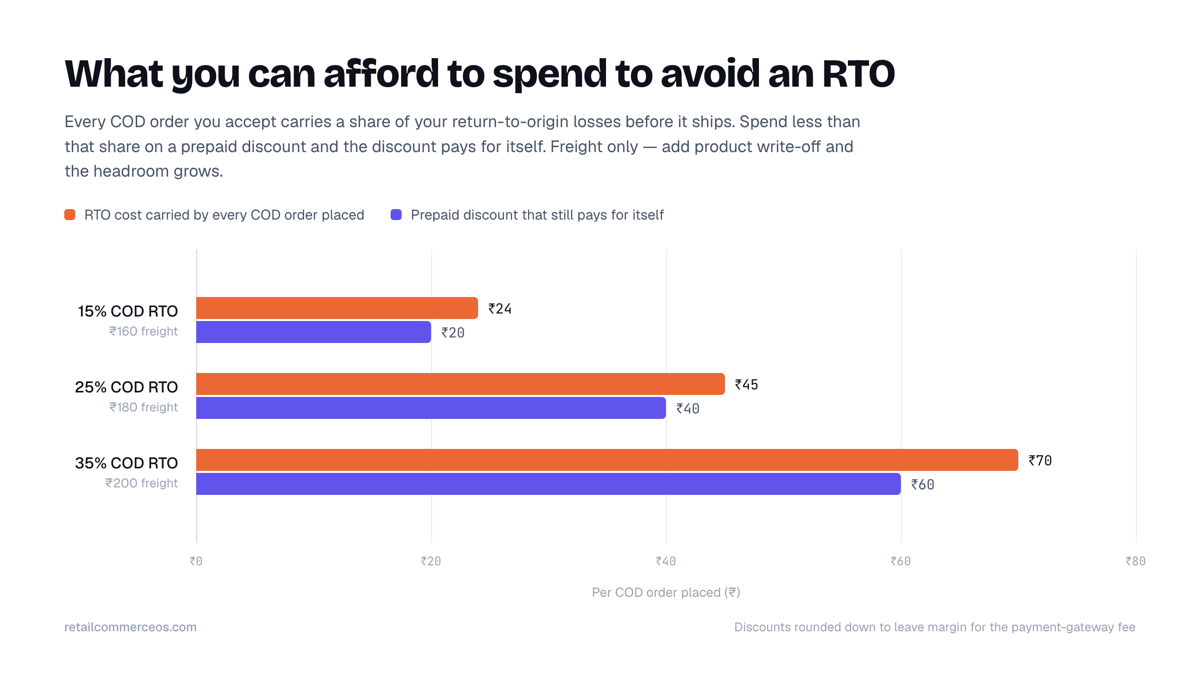
The break-even maths on a prepaid discount
Before offering any discount, calculate the RTO cost per COD order for your specific catalogue, not an industry average.
RTO cost per COD order (simplified)
RTO rate (as a decimal) × (forward shipping + reverse shipping + product cost of damaged/unsaleable units)
Example with conservative numbers:
- COD RTO rate: 25%
- Forward + reverse shipping: ₹180
- Product write-off per RTO (assume 10% of orders are unsaleable): ₹600 × 10% = ₹60 blended across all RTOs
RTO cost per COD order placed = 0.25 × (₹180 + ₹60) = ₹60 per order
That ₹60 is what you can spend to convert that order to prepaid before it becomes an RTO. A flat ₹50 prepaid discount on a ₹600 order is a 8.3% discount. That is cheap compared to a 25% chance of losing ₹240 in shipping and product costs.
The maths changes at low RTO rates. If your COD RTO is under 10%, the same discount may not pay for itself — keep reading to the partial-COD section instead.
Build your own table:
| COD RTO Rate | Shipping Cost (F+R) | RTO Cost per Order Placed | Max Viable Prepaid Discount |
|---|---|---|---|
| 15% | ₹160 | ₹24 | ₹20–22 |
| 25% | ₹180 | ₹45 | ₹40–42 |
| 35% | ₹200 | ₹70 | ₹60–65 |
Round down slightly to leave margin for the payment gateway fee (typically 1.5–2% on UPI, slightly higher on cards).
---
Prepaid discounts: structure and placement
A prepaid discount works only if the customer sees it at the moment they are choosing a payment method. Bury it in a banner and it does not convert.
Effective placement:
- In the payment method selector, directly next to the prepaid option: "Pay online — save ₹50"
- In the cart, as a line item that disappears if COD is selected at checkout
- In abandoned-cart recovery messages, specifically mentioning the prepaid saving
Discount structures that work:
Flat rupee discount — simplest to understand, easiest to calculate break-even on. Recommended for orders under ₹1,500.
Free shipping on prepaid, paid shipping on COD — effective because customers mentally separate "discount" from "fee". A ₹60 COD fee feels like a penalty; free shipping on prepaid feels like a reward. Same economics, different perception.
Percentage discount capped at a ceiling — useful for catalogues with wide order value spread. "5% off, up to ₹75" protects margin on high-value orders.
Do not stack a prepaid discount on top of an already-discounted promotional price. You will train customers to wait for stacked offers.
---
UPI-first checkout
India's prepaid conversion problem is partly a trust problem and partly a friction problem. UPI-first checkout addresses the friction.
A checkout that shows UPI as the default — or the first — option, with COD lower in the list, shifts behaviour without any discount. This is not dark pattern design; it is accurate sequencing. Most Indian smartphone users have at least one UPI app installed. The cognitive default should reflect that.
Specific things to check in your checkout configuration:
- UPI (including UPI Collect and UPI Intent for mobile) is listed before COD
- On mobile, UPI Intent is enabled so the customer is taken directly to their payments app rather than entering a VPA manually
- COD is not the pre-selected option
If your checkout platform charges differently for payment method display order, the conversion lift typically more than covers the fee. Test it with a simple A/B if you have the volume.
---
Partial-COD (COD with a prepaid advance)
Partial-COD is a middle-ground: the customer pays a portion (typically ₹99–₹199) online at checkout and the remainder as COD on delivery. It does two things:
- It proves intent. A customer who has already transferred ₹99 is significantly less likely to refuse delivery.
- It reduces your net RTO loss even when the order is refused, because you keep the advance (subject to your refund policy).
This works well when:
- Your average order value is high enough that a full prepaid discount is expensive
- Your RTO rate is moderate (15–25%) rather than extreme
- You serve pincodes where COD is a cultural norm, not just a preference
Keep the advance amount low enough to feel like a booking fee, not a barrier. ₹99 on a ₹900 order converts better than ₹199, and still filters out most casual refusers.
---
WhatsApp confirmation flows
A significant portion of COD RTOs happen because the customer forgets, is unavailable, or was never fully committed. A WhatsApp confirmation flow sent after order placement — not just an order confirmation, but an active confirmation request — addresses all three.
A basic flow:
- Order placed (COD) → immediate WhatsApp message confirming order details and expected delivery window
- Message includes a single-tap option: "Confirm my order" or "Need to cancel?"
- If no response within 4 hours, a follow-up with the same options
- Non-responsive or cancelled orders are flagged before dispatch
Brands that run this flow typically see two outcomes: a reduction in RTO from better-filtered dispatch, and a secondary conversion opportunity — the confirmation message can include a prepaid upgrade option ("Switch to prepaid and get ₹50 off — tap here").
The confirmation flow also gives you data. Customers who routinely fail to confirm are candidates for COD blocking by pincode or customer tag on their next order.
---
Post-order prepaid conversion
The window between order placement and dispatch is often 12–48 hours. Use it.
After a COD order is placed, send a time-limited prepaid conversion offer:
- Channel: WhatsApp or SMS (WhatsApp converts better if you have the customer's consent)
- Timing: 1–2 hours after order placement, while purchase intent is still high
- Offer: the prepaid discount (from your break-even calculation) with a 6–12 hour expiry
- CTA: a direct payment link, not a redirect to the homepage
This recovers customers who chose COD because of checkout friction, not because they distrust prepaid. Some percentage of them will switch when the offer arrives on their phone with a clear payment link.
Track this conversion rate separately from checkout conversion — it is a distinct lever with its own economics.
---
Blocking or restricting COD by signal
Once you have data, restrict COD selectively rather than universally. Removing COD entirely for all customers raises cart abandonment, especially in Tier 2 and Tier 3 cities where prepaid trust is still building.
Restrict COD for:
- Pincodes with historically high RTO rates (most logistics APIs return pincode-level RTO data)
- Customers who have previously refused delivery
- Orders above a threshold AOV where prepaid discounting is cheaper than the RTO exposure
Apply these restrictions at the checkout level so high-intent customers from high-risk pincodes still see a path to purchase — just a prepaid-only path.
---
Putting it together
None of these tactics requires a complete checkout rebuild. Start with the one that matches your current RTO problem: if RTOs are high, run the prepaid discount and WhatsApp confirmation flow first. If RTOs are moderate and AOV is high, add partial-COD. If checkout friction is the issue, reconfigure payment method order.
Retail Commerce OS surfaces COD RTO data by pincode and customer, which makes it easier to set intelligent COD restrictions without guessing. But the break-even maths and the flow design above work regardless of what tools you're running — get the numbers right first, then decide what to automate.